

Have you always wanted to explore Pleasantview as an open world? Well, now you can in our Sims 3 version of this iconic neighborhood!
What started as a daunting solo project soon turned into a collaboration with my friend and fellow Simmer, Caleb (aka PlaySims). He did an amazing job creating many of the lots to complete Pleasantview (and all of the NPCs). If you want to see more of his amazing builds, visit his blog or Youtube channel. Thanks Caleb!
This world was created with basegame and Late Night content only (no CC). It’s populated by all the Pleasantview residents, townies, and original NPCs. Includes a brand-new map that’s as close as I could possibly get to the original ‘hood (made in CAW).
I wanted to keep it basegame only, but unfortunately The Sims 3 BG does not include hot tubs or dart boards. And it just wouldn’t be Pleasantview without hot tubs and dart boards! So, you will need the Late Night expansion for everything to work properly.
Here’s a lovely trailer created by Caleb:
And here’s my video tour, if you want to see more:
Residential Lots

The residential lots are as close to the originals as possible, but I did make a few additions. Since The Sims 3 basegame comes with air conditioners, toilet paper roll holders, and electrical boxes, all homes have these installed. Likewise, Night Life comes with air conditioning vents, so all homes also have vents to complete their heating/cooling systems.
And finally, all homes are equipped with smoke detectors and at least one light in every room. It really bugs me how in TS2 you can buy a house and it won’t have any lighting in it. I think it’s very rare that would happen in real life, so I installed a realistic number of light fixtures on each lot.
A note about hot tubs: The Sims 3 does not have free-standing hot tubs. They are all sunken in the ground. And if you place one on a rooftop, it protrudes into the room below. This was a problem because both Don’s and the Caliente’s condos have rooftop hot tubs. I used a frieze to make a tiny space on the roof for the bottom of the hot tub to sink into. This results in a slightly different look than the original, but the hot tubs are there! Plus, I think it looks kind of neat, too.
Community Lots

Community lots come equipped with air conditioners, air vents, electrical boxes, and dumpsters. Community lot bathrooms include mirrors, soap dispensers, and toilet paper roll holders.
Once again, no custom content. This is all stuff that comes with basegame or Night Life. All community lots also have bike racks and parking. Exceptions are the Criminal Warehouse (no bike racks) and City Hall, Woodland Park, and Woodland Cemetery (no dedicated parking).
290 Main Street (clothing store) and 330 Main Street (grocery/game store) have been replaced by rabbit hole shops and made into a “downtown” area. Functional versions of the original lots can be recreated with mods and a LOT of CC. But I decided not to include any CC or mods in this world because I wanted as many people as possible to be able to play it.
Rabbit Holes

Because of the way The Sims 3 handles jobs, it was necessary to add certain lots to the world that were not part of the original Pleasantview. This is the only way your Sims can go to work and take classes. In this CC-free Pleasantview, I kept the Sims 3 functionality by using rabbit holes.
One of each type of the basegame rabbit holes have been added to the world including:
- Military Base (military career, handiness class)
- Science Facility (science career, logic and gardening classes)
- Grocery Store (grocery shopping, part-time job, fishing class)
- Book Store (book shopping, part-time job)
- Restaurant/Bistro (culinary career, cooking class)
- Spa (part-time jobs)
- Abandoned Warehouse (criminal career)
- City Hall (political career, charisma class)
- Hospital (medical career)
- Mausoleum (part-time job, part of the cemetery)
- Corporate Tower (business and journalism careers, writing class)
- Police Department (law enforcement career)
- School (education career, painting class)
- Stadium (sports career, athletic class)
- Theater (music career, instrument classes)
Think of this as a majorly updated, more realistic version of Pleasantview that includes all the services and amenities of a real town.
If you have expansion packs, there is PLENTY of room to add additional lots to the world (fire station, junk yard, consignment shop, etc.) You can go to World Editor in the game and add new lots anywhere you like. You may have to remove some trees, but there is still a lot of empty flat space along the roads.
Playable Families
The world includes all the playable families from the OG Pleasantview – including the Burbs and Oldies. All playable families were created by me, with the exception of the Oldie Family who were created by Caleb. The Burbs and Oldies live in the starter houses on Main Street and Woodland Drive.

Note: Bella Goth is dead and buried in the Goth family cemetery. She died of electrocution. Skip Broke is dead (drowning) and buried in the Woodland Cemetery. Darleen Dreamer is dead (fire) and buried under the Willow Tree at the Dreamer’s home. Michael Bachelor is dead (old age) and his remains are located in the Caliente Condo. No other ancestors are included.
Townies & NPCs
Creating all the townies and NPCs was a challenge – not because of how many there are – but because making exact replicas of the TS2 versions was nearly impossible without custom sliders. In case you didn’t know, many Sims in TS2 have the EXACT SAME FACE. Also, the CAS and art style is SO different in The Sims 3.

So, I had to make some changes and make them over Sims 3 style. I tried to keep their overall appearance recognizable, obviously using their original skin tones, hair and eye colors. I also kept any stand-out features, like Komei Tellerman’s angular face and Sandy Bruty’s lips, etc. I got as close as I possibly could – but some Sims have slightly different hair and/or outfits than their original counterparts.
Townies were created by me and NPCs were created by Caleb. Please note that The Sims 3 only requires two NPCs of each type instead of the three that TS2 uses. We selected two of each NPC type. The only exception are the maids – Kaylynn, Lucy, and Remington are all included.
WARNING: If you play with Nraas Story Progression, DO NOT get rid of homeless Sims when prompted or all the townies will be deleted.
There are some NPCs that did not have a Sims 2 equivalent. Your game will generate the following:
- Magicians
- Science geeks
- Repo-man and repo-woman
- Social workers
While Sims 2 did have repomen and social workers, they were not actual Sims with names and personalities that could be recreated.
Download The Sims 3 Pleasantview

And now for the moment you’ve all been waiting for – the downloads! There are two versions of the world available – one is populated and one is unpopulated (in case you don’t want to use our Sims).
Unpopulated Version
The unpopulated version is a Sims 3 package file. Simply place it in your Documents > Electronic Arts > The Sims 3 > Downloads folder. Then install it through the launcher as you would any other Sims 3 pack. It will show up in your list of neighborhoods when you start a new game.

Alt Download Links: SFS / Media Fire
Populated Version
The populated version is a shared save. Due to the limitations of the Create-a-World tool, it’s impossible to share populated worlds that include dead Sims. So, the families were added in-game and must be shared as a save file.
YOU NEED BOTH DOWNLOADS FOR THE POPULATED WORLD TO WORK!! MAKE SURE YOU DOWNLOAD AND INSTALL THE EMPTY WORLD ABOVE AND THE SAVE FILE BELOW. IF YOU DON’T INSTALL BOTH, YOU WILL GET A MESSAGE THAT THE WORLD WAS SAVED WITH AN EXPANSION PACK YOU DON’T HAVE.
Installation Instructions
- Install the unpopulated world using the instructions above.
- Download the zipped file below. Extract the folder from the zipped file using 7-zip or another similar program. The extracted folder is the save file.
- Place the save file in your C:/…Documents/EA Games/Sims 3/ Saves folder after you’ve installed the world.
Now when you start the game, you’ll have a new save file that is the world with Sims in place and ready to play. If you want to start over, you’ll have to replace the save file. To prevent the need for this, immediately use the “Save As” function when you open the save to create a clean copy of the save.
Alt Download Links: SFS / Media Fire
When you first open the game, all the Sims, careers, skills, relationships, etc. are exactly as they are in TS2 Pleasantview. Don Lothario will be the active household. If you use story progression, things will start to happen almost immediately.
You need to change the following setting in NRaas Story Progression to prevent the game from deleting the Pleasantview Townies:
- General Options > Options: Households > Mange Homeless = False
If you don’t use NRaas Story Progression, I have no idea what will happen to the townies. I can’t help you there. See the rest of my recommended mod settings here.
Updates and Bug Fixes
The following bugs have been found and fixed in the shared save. If you’re experiencing any of these issues, please re-download or perform the fixes outlined below.
- Angela and Lilith were not set as enemies. This has been fixed. You can re-download or use Master Controller to set their relationship to enemy.
- Weird trees floating off the ground on the big hill before the bridge. Fixed. Re-download or fix the trees in World Editor.
- Routing issues with the Pleasant Family. They couldn’t leave their lot. Fixed. For some reason, the fence around their property was preventing them from leaving the lot. Moving it one tile away from the edge fixes the issue.
- Doors were missing on the second floor of the Caliente condo. Fixed 04/21/20.
- Ceiling went all the way through the top floor of Goth house (my fault). Fixed 04/24/2020
- Townie Brittany Parker was missing. She’s back as of 04/24/2020.
Recommended Mods
Although you can play this world with no mods or custom content at all, I do recommend a few things to improve your gameplay experience. These are totally optional.
- Nraas Story Progression – If you want to play rotationally like in The Sims 2, see this tutorial. Also recommended to control your population and prevent the game from deleting the custom townies or adding new ones you don’t want.
- Nraas Error Trap – Although optional, HIGHLY recommended. This mod will catch any routing errors and significantly decrease lag.
And of course, I always recommend checking my Sims 3 recommended mods list.
Placing Expansion Lots
Here’s a guide to placing expansion pack lots in Pleasantview. There is space for them if you know where to look! You may not want or need to place every single available expansion lot. This is just to help you with placing the ones you do want.
Seasons: Festival Grounds
Festival grounds can be placed across the road from the Doo Peas Corporate Tower. Here’s how to place them.
-
- Go into “Edit Town” and then into “World Editor.” Select the “trees” tab and remove all the trees from the area. Remove trees by selecting them with your mouse and pressing the “Delete” key on your keyboard. Note: If you don’t remove trees, you can still place the lot and the trees will be removed automatically. I just prefer to move the trees myself and reposition them after the lot is placed.

-
- Now, select the “Lots” tab and place a 64×64 lot along the road. It won’t place right in the corner, you’ll have to move down the road a few spaces.

- Next, click the “World Editor” button again to return to Edit Town mode.
- Click on your new lot and select “Change Lot Type.” Choose “Community” and from the drop-down box choose “Festival Grounds.”
- Select the “Community Lots” tab. Choose the Festival Grounds you like and place a copy on the new lot. You’ll be prompted to rotate the lot. You may want to place a few trees along the side of the lot next to the road, but that’s up to you!

Ambitions: Salon & Tattoo Parlor
There’s room for the Salon and Tattoo Parlor right across the street from the Condo District and behind Brandi Broke’s house. Follow the steps above for placing a lot in World Editor.
-
- In World Edtior, place a 30×20 lot in the corner as pictured below. This lot needs to be placed in a corner or it won’t look right because it’s actually 20×30 in size and World Editor doesn’t give you an option for a lot that size.

- Next, click the “World Editor” button again to return to Edit Town mode.
- Click on your new lot and select “Change Lot Type.” Choose “Community” and from the drop-down box choose “Salon.”
- In Edit Town, go to community lots and find the “Barney’s Salon and Tattoo.” Place it on your lot and rotate it toward the road if necessary. You will have to manually remove the Oak Tree beside it in World Editor or it will protrude into the lot as seen below.

Ambitions: Fire Station
There are a few places you can place the Fire Station, but I prefer to place it across the street from the Day Spa.
- In World Editor, place a 30×20 lot across from the Day Spa. Make sure the shorter end of the lot is against the street. You can turn lots by using your mouse or the > and < buttons on your keyboard.

- Next, click the “World Editor” button again to return to Edit Town mode.
- Click on your new lot and select “Change Lot Type.” Choose “Community” and from the drop-down box choose “Fire Station.”
- In Edit Town, go to community lots and find the “Community Fire Department.” Place it on your lot and rotate it toward the road if necessary.

Ambitions: Other Lots
Now that you have the hang of placing lots, I’m gonna simplify things and just tell you the lot sizes and locations for the remaining lots.
- Junk Yard (Grady’s Junk Stop Junkyard) – Lot size: 30×20, Lot type: junkyard, Placement: across the street from the shack on Oak Street. Once again, you’ll need to remove some of the trees in World Editor or they will overlap the lot as seen below.

- Consignment Store (Landgraab Sell n’ Swap) – Lot size: 30×20, Lot type: Consignment Store, Placement: beside the fire station and across the street from the library.

Pets Lots
- Equestrian Center (Petite Pony Equestrian Center) – Lot size 40×40, Lot type: equestrian center, Placement: on Main Street at the edge of town near the small pond.

- Horse Training Grounds (Pump it Pony Training Grounds) – Lot size: 40×40, Lot type: Horse Ranch, Placement: next to the equestrian center on Main Street near the small pond. This is actually a 40×30 lot, which is not available in World Editor so it doesn’t fit quite right. You can make it look nice by extending the path from the entrance to the road.
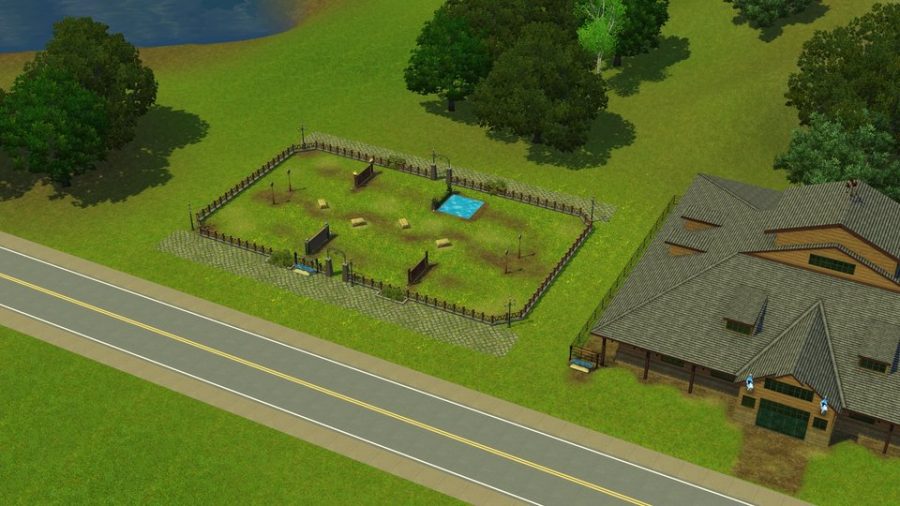
- Dog Park (Faux Paw Dog Park) – Lot size: 30×20, Lot type: Dog Park, Placement: Main Street past the condos and before the bend in the road.

- Cat Jungle (Litter Acres Cat Jungle) – Lot size: 30×20, Lot type: Cat Jungle, Placement: on Lakeside Drive just catty-corner to the Dog Park.

Showtime Lots
- Big Show Venue (Hoi Polloi Event Center) – Lot size: 64×64, Lot type: Big Show Venue, Placement: Next to the festival grounds at the bottom of the big hill. You’ll need to remove some of the trees around this one.

- Performance Park (Big Park) – Lot size: 30×30, Lot Type: Big Park, Placement: Next to the condo district behind the billboard.

These are all the major types of expansion lots in the game. There are still many more lots you can place – things like bars, parks, hangouts, etc. And there is still PLENTY of empty space left to place them. Just choose a lot size and move it along the road until it turns green. Not every single space along the roads will work, but many will. You can also place beach lots near the beach and more housing for your Sims!
If you play this world, please leave a comment below and let us know what you think! We have thoroughly play-tested, but it’s still possible there may be a bug we missed. If you find anything wrong, please let us know! And enjoy!


Is there a video on how to install the town.
The town is installed. I tried to follow your written instructions but when I load up my game it shows my town as empty and no active household for Don.
the link is dead. its a 404 🙁
There are two alternate download links under the download button if dropbox isn’t working.
Is it supposed to have a pop up saying that I need to install the updated version? I had no problems with the populated version but the unpopulated one is saying it’s an older version and I may experience crashes.
Hi there! Im so excited to download this – I’m unsure if just a problem for me but when I click the download button for both the links it brings me to an error message on DropBox. Apologies if this question has already been answered! What the best way to go about downloading?
Thank you so much, it looks fantastic – cant wait!!
Hi! You’ll need to use the links underneath the Download button for Sim File Share or Media Fire if Dropbox isn’t working. But I would recommend downloading the updated version of this world here: https://pleasantsims.com/sims-3-pleasantview-updated/
thank you so much!
You’re welcome!
Oh, I really wanted to play with it, but I don’t have Late Night 🙁
Hi Cindy,
I have downloaded the unpopulated world with MediaFire and put in into my Sims 3 downloads folder. I have double clicked onto it which seems to unzip it, however I can’t seem to install it, the launcher isn’t coming up.
Thank you
Ilex
Hi Cindy,
Is the dropbox link above the best place to download this amazing neighborhood? Everytime I click on it, it takes me to 404 Page Not Found. 🙁
Thanks so much for making this neighborhood! I’m excited to hopefully play it and reminisce on Sims 2!
Hi Sarah, try the alternate link underneath the download button.
Hi Cindy! I have been a fan and subscriber of your youtube channel for a long time. I started playing the Sims 3 back in 2011 and around 2014 I, also, fell in love with the Sims 2 (I’m still trying to like the Sims 4 because, you know, it’s a sims game too but I lose my interest for it very easily!). I use a lot of your gameplay rules and they have made my games much more interesting…
Thank you for all your wonderful content and for giving as the chance to play Pleasantview in the Sims 3 (Pleasantview and Riverside are my favourite hoods from the Sims 2!). I find your tutorials very helpful too, in fact, you helped me fix the issue I got some time ago with the First Born Syndrom, the video you’ve made was perfect for me because I’m totally afraid to use SimPE, unless someone guides me step by step what to do…
I have only one question about Pleasantview for the Sims 3: Do I have to be patched to the 1.69 patch to be able to download and play this world? Up until now I have refused to update to 1.69 because I find it kind of lame! EA released this patch for no other reason but to make us play the Sims 3 through Origin and they still refused to fix the million bugs and glitches they left in the game. The patch is actually useless because there was, already, a mod that did exactly the same thing, allowing the player to choose which pack to use for specific save games.
I have all the EPs and SPs for the Sims 3 (even Katy Perry’s pack, lol, which has a lot of content that I find useful for decorating kids/toddlers’ rooms and I like the venues that came with it!) and almost everything from the Store, including all the worlds from it.
So, do I have to make the “sacrifice” and update to 1.69 to be able to play Pleasantview?
Hi Natassa! I don’t think you have to patch the game to play the world. It was created using Create-a-World for patch 1.69, but as far as I know you should still be able to play it with 1.67. I can’t say for sure because my game is patched, but it won’t hurt anything for you to try it out! Thank you for stopping by!
Hi Cindy, I just wanted to thank you for making this. I’ve been needing a new place to play that didn’t require too many mods and or expansion pack. And since you remade something I really liked in the sims 2, I just had to download. I wonder, are you going to make other sims 2 places for the sims 3? Also, do you have any other world recommendations that don’t require a lot of cc or expansion packs?
There are no concrete plans, but we may make other worlds in the future. As far as other custom worlds, I haven’t ever played any that are populated. But My Sim Realty has some amazing worlds you can check out: http://www.mysimrealty.com/Sims3_Worlds.html
Hi Cindy! Pleasantview is flawless, I have played the world recently, and it got a whack! The story progression made Angela got knocked up by Dustin during while being teenagers. Both Cassandra and Alexander left Mortimer alone in the house. Cassandra moved in with the Caliente sisters for some sort and Alexander (who just aged up to a teen) moved in to 113 Wright Way. I never knew NRAAS mods were so useful and make the progression go crazy!!
My question is why aren’t Michael and Bella siblings, in Bella’s family tree, it is just Cassandra and Alexander, but her brother is not in the family tree.
Because Bella was already deceased when I created Michael and I just didn’t set their family trees since they were dead. But you can easily set them as family yourself with Master Controller if you like!
Hi Cindy! I’m a big fan of your channel. I got back to playing TS2 because of you and now I went back to TS3, also because of you. The way you play the game is very inspiring!
I really want to play this version of Pleasantview you made, but I’m having an issue when installing it. TS3 Launcher will recognize the world item (as explained in your post, I’m first downloading the empty world), but when I try to download it, it says that I need an software update, which doesn’t make sense since my game is updated.
Also, I have all the EPS (minus Around the World).
Do you know why this might be happening and how to solve it?
Thank you very much in advance <3